
Are you tired of slow internet speeds? Do you see “5G” everywhere but your phone is still stuck on 4G? You are not alone — millions of people around the world are asking the same question every day.
In this guide, you will learn the honest truth about converting 4G to 5G, what steps you can take if your phone already supports 5G, and what to do if it doesn’t. No confusing technical language — just clear, simple advice.
What Does “Converting 4G to 5G” Actually Mean?
When people talk about converting 4G to 5G, they usually mean one of two things:
- They want to enable 5G on their existing phone (if it already supports it).
- They want to upgrade from a 4G phone to a 5G phone to enjoy faster internet.
It is important to understand the difference because the steps are completely different depending on which situation you are in.
Can You Really Convert a 4G Phone to 5G?
Here is the honest answer: you cannot upgrade a 4G phone to support 5G. That is because 5G relies on dedicated hardware — like a 5G modem and compatible antennas — which 4G phones simply do not have.
Think of it this way — it is like changing a 2023 model car into a 2025 model. You cannot make that change. You would need to buy a new one.
5G technology requires specific hardware components that are not present in older 4G devices. This includes a new modem, antenna, and other parts that are necessary to support the higher speeds and lower latency of 5G networks.
So if someone tells you there is a secret trick or app to magically turn your 4G phone into a 5G phone — that is simply not true.
Key Benefits of 5G Internet
Before we talk about how to switch, let’s understand why 5G is worth it:
- Blazing Fast Speeds — 5G networks can deliver speeds up to 100 times faster than 4G. Downloading a movie that might take minutes on 4G can be done in seconds on 5G.
- Lower Latency — 5G offers latency as low as 1 millisecond, compared to 30–50 milliseconds for 4G, making real-time interactions much smoother.
- Better in Crowded Areas — 5G can support a much higher number of devices per square kilometer compared to 4G, which is crucial for densely populated areas where network congestion can be a problem.
- Improved Streaming and Gaming — With 5G, watching high-definition videos, video calls, and online gaming all become significantly better.
How to Enable 5G on Your Phone (If Your Phone Already Supports It)
If your phone is already a 5G-capable device, switching on 5G is very simple. Here is how to do it:
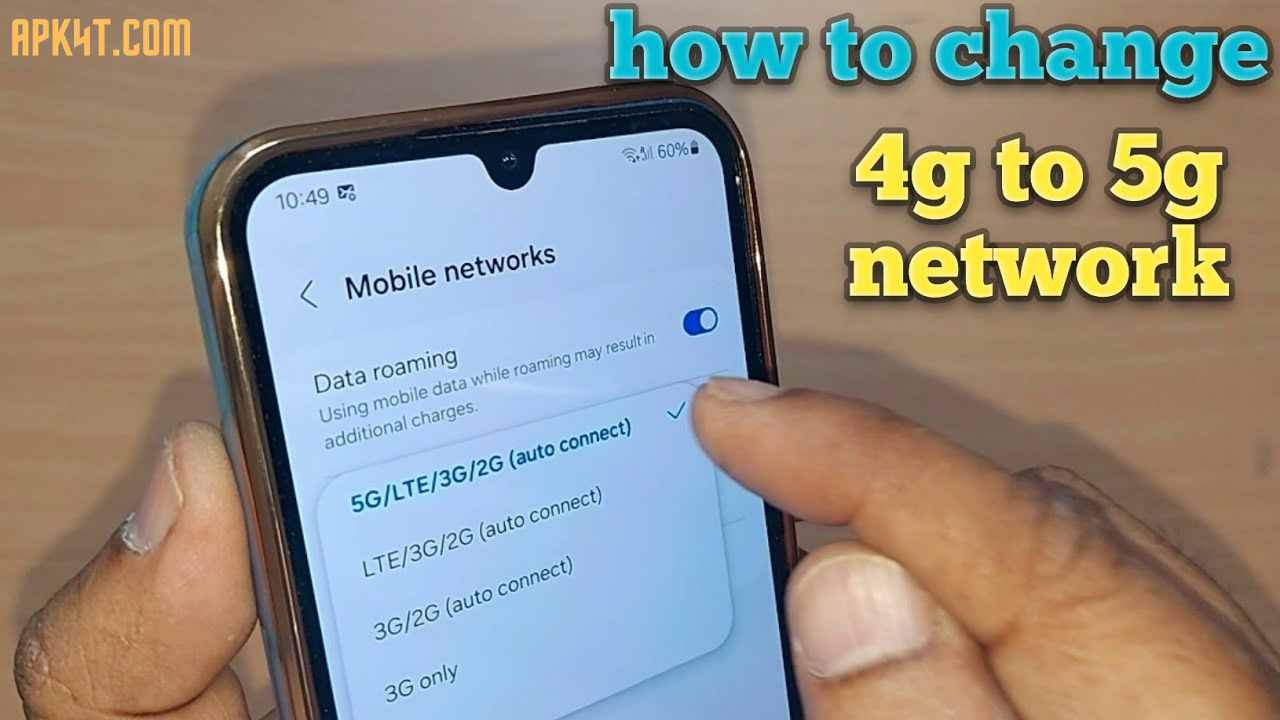
On Android: Go to Settings → Network & Internet → Mobile Network → Preferred Network Type and select 5G.
On iPhone: Go to Settings → Cellular → Cellular Data Options → Voice & Data → Select 5G On or 5G Auto.
That’s it! Your phone will now connect to 5G whenever it is available in your area.
Tip: If you do not see a 5G option in your settings, your phone likely does not have 5G hardware. In that case, the option simply will not appear.
What to Do If Your Phone Is 4G Only
If your phone does not support 5G, here are your best options:
Option 1 — Upgrade to a 5G Phone
This is the most reliable solution. Today, 5G phones come in various price ranges and brands, allowing you to find a suitable option. Most 5G phones automatically detect and connect to the 5G network, making the switch seamless.
When shopping for a 5G phone, keep these things in mind:
- Make sure the phone supports the 5G frequency bands used by your carrier in your country.
- Different countries and carriers use different 5G frequency bands, so before purchasing, confirm whether the phone supports local network frequency bands.
- Choose a phone with a good battery — 5G networks consume more power than 4G, so it is recommended to choose phones with battery capacity greater than 4000mAh.
Option 2 — Use a 5G Wi-Fi Hotspot
If you are not ready to buy a new phone yet, you can look for public or personal 5G Wi-Fi hotspots to access faster network speeds. This will not give you true mobile 5G, but it can give you faster internet on your existing phone through Wi-Fi.
Option 3 — Optimize Your Current 4G Connection
While waiting to upgrade, you can make your 4G faster by:
- Restarting your phone regularly to refresh the network connection.
- Moving to areas with stronger signal coverage.
- Closing background apps that use unnecessary data.
- Checking if your carrier has upgraded towers in your area.
Do You Need a New SIM Card for 5G?
This is a very common question — and the good news is: there is no need to change your SIM card to access 5G. Your existing 4G SIM will work perfectly with the new network.
So once you have a 5G phone, you can keep your same SIM card and phone number. Just insert it and go.
Pros and Cons of Switching to 5G
Pros:
- Much faster internet speeds for browsing, streaming, and video calls
- Lower delay, which is great for gaming and live videos
- Future-proof — 5G networks will only grow bigger
- Better performance in busy, crowded places
Cons:
- Requires buying a new phone if your current one is 4G only
- 5G coverage is still expanding and may not be available in all areas
- Slightly higher battery usage compared to 4G
- 5G plans may cost a little more depending on your carrier
Practical Tips to Get the Best 5G Experience
Once you have a 5G phone, here are some simple tips to enjoy the best speeds:
- Always keep your phone software updated — Updates often improve network performance and 5G stability.
- Choose a carrier with strong 5G coverage in your city or region before switching plans.
- Use 5G Auto mode (available on most phones) — this lets your phone switch between 4G and 5G automatically to save battery when 5G is not needed.
- Position matters — Being near a window or outdoors usually gives a stronger 5G signal than being deep inside a building.
- Check your data plan — Make sure your mobile plan includes 5G access, as some basic plans may still route you through 4G.
FAQs — Frequently Asked Questions
Q1: Can I convert my 4G phone to 5G without buying a new one? No. A 4G phone does not have the hardware needed for 5G. No app, setting, or software update can change this. The only way to get 5G is with a 5G-capable device.
Q2: Will my 4G phone still work after 5G becomes common? Yes, for now. Most cell networks today use both 4G and 5G bands, so your 4G phone will still work, although at a slower speed.
Q3: Do I need a new SIM card to use 5G? No. Your current SIM card will work on a 5G phone without any changes needed.
Q4: How do I know if my phone is 5G-capable? Check your phone’s settings under Network or Mobile Data. If you see a “5G” option in the preferred network type, your phone supports 5G. You can also search your phone model online to confirm.
Q5: Is 5G safe to use? Yes. Current research indicates that 5G is safe. The frequencies used by 5G are within international safety standards.
Conclusion
The truth is simple — you cannot magically convert a 4G phone into a 5G phone. But if your phone already supports 5G, enabling it takes less than a minute from your settings. And if your phone is 4G only, upgrading to a 5G device is the smartest move you can make for a faster, more reliable internet experience.
5G is not just about speed — it is about getting ready for the future of mobile technology. From smoother video calls to instant downloads, the difference is real.
Ready to experience faster internet? Explore 5G phones that fit your budget and get started today. 🚀
This article is written for informational purposes. Always check with your mobile carrier for the latest 5G availability in your area.